This post isn’t so much about RS-485 as it is about running into “silent errors” in your program that either break things in mysterious ways or flat out crash the whole thing. This is a tale of the latter.
My Setup
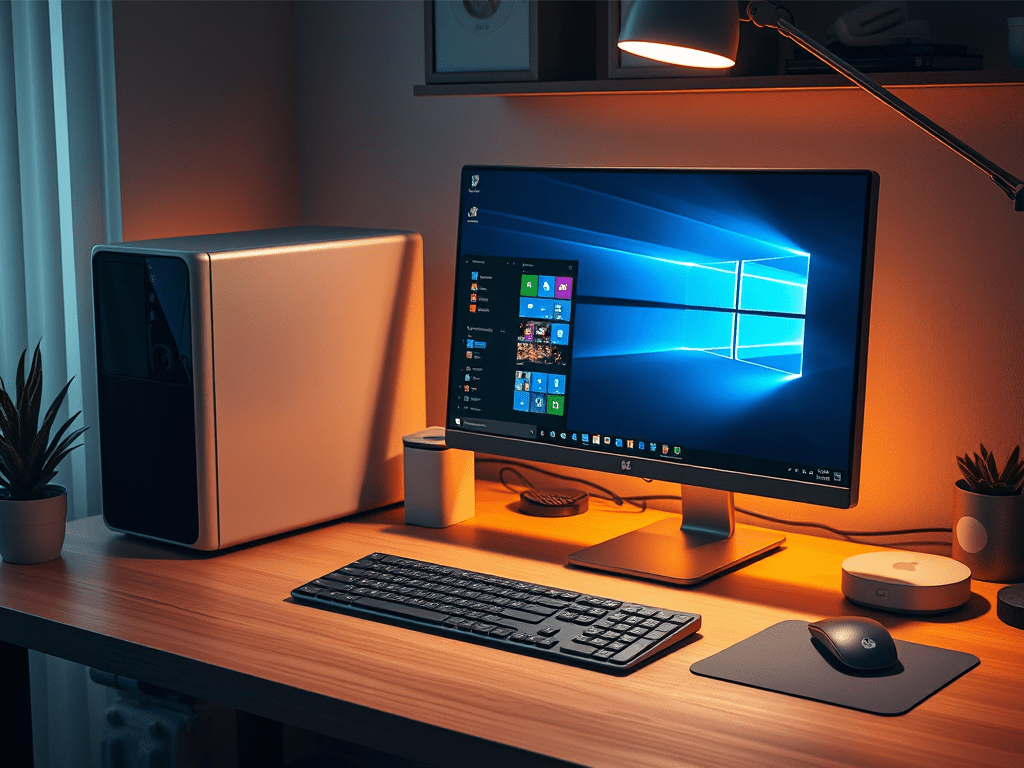
I have a very basic setup in my home office:
- Displays (x3)
- 1 workbench monitor
- 2 desk monitors
- Sources (x4)
- a Windows PC
- a laptop dock
- a Raspberry Pi
- a Mac Mini
- Crestron Control
- TS-770
- DMPS3-4K-150-C
- CEN-IO-COM-102
- CP3
- CP4
- Signal Routing
- 2 Extron SW4 HD 4K
- 1 Extron SW4 USB Plus
- 1 ATEN USB Switcher
If you’ve worked in A/V long enough you’ve acquired a collection of e-waste items that you’ve saved (or delayed) from going to a landfill. You’re never quite sure how you’re going to use something, but it hurts your soul to throw away a perfectly good piece of equipment. Is it electronics hoarding? Maybe… but I try to keep what I hold onto now in daily use.
I’ve paired things down considerably. But if I ever purchase a new desk, I’m going to rip everything out and do it all again! Such is A/V.
Evolution
I originally had a Crestron HD-MD4x2-4K-E driving my dual monitor setup. This let me switch between a dedicated PC (dual output) and my laptop dock (dual output). PC is for fun; laptop is for work. Supporting Crestron gear in your program is pretty simple since it’s usually IP tables keeping everything connected behind the scenes. But every now and then I would switch between computers, and one of my screens would show snow. I suspect this was HDCP failing, but nothing in my setup requires HDCP. This HDMI switcher has long been discontinued–no more firmware updates–but this is likely a failing device anyway.
So, I pulled from my stock of saved equipment and put in 2 Extron SW4 HD 4Ks to replace the Crestron switcher. I’m swapping one discontinued device for another! So far I’ve had more reliable switching using the Extron gear. This gives me a combined 8 inputs to 2 outputs, so it opens up the possibility of wiring in more devices (so I added the Mac Mini and Raspberry Pi to the mix). But now I need to switch keyboard/mouse/webcam/printer between 4 devices. I added an Extron SW4 USB Plus to handle that, thus completing my e-waste KVM setup.
Reprogramming
I’ve got a very simple touchpanel layout on my TS-770 that I hope to update to HTML5 soon. It allows me to do matrix routing to the 2 displays, save 4 presets, but otherwise, it serves as desk clock.
My DMPS3-4K-150-C runs the office program, so I’ve had to maintain a VS 2008 project to keep 3-series compatibility. The DMPS is nice to have since it gives me some other HDMI switching at my workbench when I need it, but my main computer sources don’t route through it.
Ripping out the Crestron HD-MD4x2 switcher and replacing with Extron equivalents isn’t so bad. I added a CEN-IO-COM-102 to communicate via RS-232 to the two Extron HDMI switchers. This being a Crestron expander device, it’s easy to get it working with the program:
public override void InitializeSystem()
{
    var exp = new CenIoCom102(0xA5, this); // CEN-IO-COM-102 is used for HDMI switchers
    exp.OnlineStatusChange += _exp_OnlineStatusChange;
    exp.Register();
}
Then I can attach my Extron drivers to those COM ports using this code:
public override void InitializeSystem()
{
    var exp = new CenIoCom102(0xA5, this); // CEN-IO-COM-102 is used for HDMI switchers
    exp.OnlineStatusChange += _exp_OnlineStatusChange;
    exp.Register();

    _switcher[0] = new AV.ExtronSw4Hd4k(); // switcher for Primary monitor
    _switcher[0].UseSerial(exp.ComPorts[1]);

    _switcher[1] = new AV.ExtronSw4Hd4k(); // switcher for Secondary monitor
    _switcher[1].UseSerial(exp.ComPorts[2]);
}
Since I also need to control the USB switcher, I added that to the built-in COM port on the DMPS. I check that the controller supports COM ports before trying to use it, mostly because I don’t want some failure to crash my program before it even starts up.
public override void InitializeSystem()
{
    var exp = new CenIoCom102(0xA5, this); // CEN-IO-COM-102 is used for HDMI switchers
    exp.OnlineStatusChange += _exp_OnlineStatusChange;
    exp.Register();

    _switcher[0] = new AV.ExtronSw4Hd4k(); // switcher for Primary monitor
    _switcher[0].UseSerial(exp.ComPorts[1]);

    _switcher[1] = new AV.ExtronSw4Hd4k(); // switcher for Secondary monitor
    _switcher[1].UseSerial(exp.ComPorts[2]);

    if (this.SupportsComPort)
    {
        CrestronConsole.PrintLine("Attaching USB switcher to COM port 1");
        _usb.UseSerial(this.ComPorts[1]); // USB switcher
    }
}
The rest of my InitializeSystem sets up the TS-770 for control and hooks my UI logic to it:
public override void InitializeSystem()
{
    var exp = new CenIoCom102(0xA5, this); // CEN-IO-COM-102 is used for HDMI switchers
    exp.OnlineStatusChange += _exp_OnlineStatusChange;
    exp.Register();

    _switcher[0] = new AV.ExtronSw4Hd4k(); // switcher for Primary monitor
    _switcher[0].UseSerial(exp.ComPorts[1]);

    _switcher[1] = new AV.ExtronSw4Hd4k(); // switcher for Secondary monitor
    _switcher[1].UseSerial(exp.ComPorts[2]);

    if (this.SupportsComPort)
    {
        CrestronConsole.PrintLine("Attaching USB switcher to COM port 1");
        _usb.UseSerial(this.ComPorts[1]); // USB switcher
    }

    var tsw = new Ts770(0x03, this); // TS-770 is the main interface

    tsw.ExtenderTouchDetectionReservedSigs.Use();
    tsw.ExtenderTouchDetectionReservedSigs.Time.UShortValue = 120; // 2 minutes
    tsw.ExtenderTouchDetectionReservedSigs.DeviceExtenderSigChange += _tsw_TouchDetection;

    InitializeUI(tsw);
}
You might notice I don’t have any try catch blocks here… that will become important later.
New Failures
This new setup works great! Except now I notice every once in a while, switching back to the PC, I lose keyboard or mouse. Usually mouse. Unacceptable!
I do some more digging through my stash and find an unused ATEN US3344i USB switcher. I’m not terribly familiar with ATEN products, but there is an RS-422/RS-485 port on it so that gives me encouragement it’s something I can switch based on touchpanel selections.
I write a small driver program for my CP3 to test ATEN control and it works fine. Wiring on the CP3 side is a little different because I’m doing RS-485 to the ATEN instead of RS-232. Pin 1 is GND, 2 is TX-, 4 is TX+. Here’s a helpful page that shows pinouts for the different processor types: https://community.crestron.com/s/article/id-1634
Control works great! I swap my driver in the DMPS program, build it, load it, and… nothing!
Not All COM Ports Are Created Equal
I check the DMPS and my program isn’t running. Looking into the error logs, I find the reason (extra spaces added to try to make this easier to read):
Error: SimplSharpPro.exe [App 1] # 2025-02-26 21:04:43  # Exception:LoadSimplSharpProApplication - System.NotSupportedException:  Specified Protocol Not Supported
   at Crestron.SimplSharpPro.ComPort.SetComPortSpec(eInternalComBaudRates baudRate, eComDataBits numberOfDataBits, eComParityType parityType, eComStopBits numberOfStopBits, eComProtocolType protocolType, eComHardwareHandshakeType hardwareHandShake, eComSoftwareHandshakeType softwareHandshake, Boolean bReportCTSChanges, Boolean bCalledFromExternal)

   at Crestron.SimplSharpPro.ComPort.SetComPortSpec(eComBaudRates paramBaudRate, eComDataBits paramNumberOfDataBits, eComParityType paramParityType, eComStopBits paramNumberOfStopBits, eComProtocolType paramProtocolType, eComHardwareHandshakeType paramHardwareHandShake, eComSoftwareHandshakeType paramSoftwareHandshake, Boolean paramReportCTSChanges)

   at Crestron.SimplSharpPro.ComPort.SetComPortSpec(ComPortSpec paramComPortSpecificationStructure)

   at HomeOfficeControl.AV.AtenUsbSwitcher.UseSerial(ComPort port)

   at HomeOfficeControl.ControlSystem.InitializeSystem()

   at Crestron.SimplSharpPro.CrestronControlSystem.InitializeSimplSharpProApplication()

   at Crestron.SimplSharpProInternal.SimplSharpProManager.LoadSimplSharpProApplication(String moduleFileName)

   at Crestron.SimplSharpProInternal.SimplSharpProManager..ctor(UInt32 appNumber, String simplSharpProAppName, UInt32 flags, Boolean& badExit)

   at Crestron.SimplSharpProEntry.b(String[] A_0)

 Error: SimplSharpPro.exe [App 1] # 2025-02-26 21:04:44  # OnProgramEventCallback: System.Reflection.TargetInvocationException: TargetInvocationException ---> System.NullReferenceException: NullReferenceException
“Specified Protocol Not Supported” !
The program throwing an exception in InitializeSystem means the ControlSystem object isn’t created, so the SimplSharpPro program trying to call into it causes a NullReferenceException and everything grinds to a halt.
The COM port on the DMPS is a 5-pole phoenix block, same as on the CP3. So why isn’t it working? I open up SIMPL Windows, make a new program with a DMPS3-4K-150-C and notice a couple things:
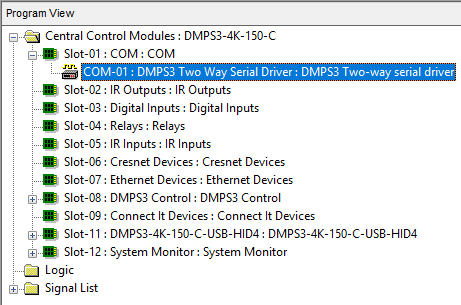

I guess that explains why I couldn’t assign an RS-485 comspec to the DMPS port, but had no problems testing on the CP3. I move the program over to the CP3, point touchpanel and CEN-IO accordingly, and everything just works.
Lessons Learned
It would have been nice to get a message on the touchpanel about failed initialization rather than having to dig through the error log, so I think I’m going to look into that. But the way my program failed–it aborted–that needs to be handled more gracefully as well. These “silent failures” mean having to chase down root causes for why the entire program stopped.
Looking in the help file for SIMPL#, COM ports do have a boolean Supports485 property that I can check. This could be tested before trying to setup the comspec in the AtenUsbSwitcher class:
public override void UseSerial(ComPort port)
{
    _port = port;

    if (_port.Register() == eDeviceRegistrationUnRegistrationResponse.Success)
    {
        if (_port.Supports485)
        {
            _port.SetComPortSpec(_spec);
            _port.SerialDataReceived += AtenDataReceived;
        }
        else
        {
            CrestronConsole.PrintLine("AtenUsbSwitcher: {0} doesn't support RS-485!", port);
        }
    }
    else
    {
        CrestronConsole.PrintLine("AtenUsbSwitcher: Failed to register COM port");
    }
}
Now when I run this program on a DMPS3-4K-150-C, I get this message printed to the console:
Attaching USB switcher to COM port 1
AtenUsbSwitcher: COM-01 doesn't support RS-485!
At least the program continues running (without USB switcher support), but I’m still forced to read console messages when I’d rather see these notifications pop up on the touchpanel. This would solve the silently failing problem I also have. But I think that’s an experiment for a different day.
If you’d like to grab the latest code and review, it’s available from my GitHub.
Thanks for reading!
 Kiel the Coder