
I had a recent job where I needed to control NewTek Spark IO decoders. These little guys have a REST API that is fairly easy to use, but require HTTP, cookies, JSON parsing, etc. Perfect fit for C# instead of SIMPL! But the HttpClient class uses asynchronous calls, so getting it to play nicely with SIMPL means you have to work around the async methods since SIMPL+ won’t see them.
My first stab at writing code to control these things works, but the module throws an exception if I dispose objects too quickly. And if a device reboots, it’s hard to tell when it comes back until an exception throws. So my code needs some clean up! I’d like to write about that once I’ve had a chance to sit down and refactor it. In the meantime, I thought it would be good to do a small example of getting async/await to work with SIMPL+.
HttpClient
HttpClient is an amazing class. It makes working with Internet traffic in C# as simple as possible. It’s also performant, so it provides asynchronous calls to handle I/O.
I want to write a really simple class to pass in a URL and get back the document body. We’ll call this class WebGet, but it doesn’t do much more than wrap an HttpClient.GetAsync call:
using System;
using System.Net.Http;
using System.Threading.Tasks;

namespace WebGetLib
{
    public class WebGet
    {
        private static HttpClient client = new HttpClient();

        public WebGet()
        {

        }

        public string GetContent(string url)
        {
            string body = String.Empty;

            try
            {
                var task = GetAsync(url);
                task.Wait();

                body = task.Result;
            }
            catch (Exception e)
            {
                body = e.Message;
            }

            return body;
        }

        private async Task<string> GetAsync(string url)
        {
            using (var response = await client.GetAsync(url))
            {
                response.EnsureSuccessStatusCode();
                var body = await response.Content.ReadAsStringAsync();
                return body;
            }
        }
    }
}
We’ll use one shared HttpClient across all WebGet objects in our program since it’s declared static. GetContent is the method we’ll call from SIMPL+. All it does is pass the incoming URL to GetAsync, then Wait on the task until it’s complete. If an exception happens, that message is returned as the string instead.
The GetAsync method is declared with async, so we can use await to handle the asynchronous method calls inside it. I declared this method private, but it won’t be visible to SIMPL+ anyway because of the async signature. You can see that this method isn’t doing much other than calling HttpClient.GetAsync and HttpClient.Content.ReadAsStringAsync. When it’s finished, it returns the content string (as body).
SIMPL+ Wrapper
It would be great if we could define the SIMPL block structure in C#, but unfortunately we have to use SIMPL+ to shim it into our program. Here’s WebGet Wrapper v1.usp:
// --- Compiler Settings ----------------------------------------------

#DEFAULT_VOLATILE
#ENABLE_STACK_CHECKING
#ENABLE_TRACE

#DEFINE_CONSTANT MAX_URL_LEN 255

// --- Libraries ------------------------------------------------------

#USER_SIMPLSHARP_LIBRARY "WebGetLib"

// --- Inputs ---------------------------------------------------------

STRING_INPUT URL[MAX_URL_LEN];

// --- Outputs --------------------------------------------------------

STRING_OUTPUT Content;

// --- Structures -----------------------------------------------------

WebGet getter;

// --- Event Handlers -------------------------------------------------

THREADSAFE CHANGE URL
{
	Trace("Getting new URL...");
	Content = getter.GetContent(URL);
	Trace("All done!");
}

// --- Module Entry ---------------------------------------------------

FUNCTION Main()
{
	WaitForInitializationComplete();
}
Whenever URL changes, we’ll pass that to our WebGet object and pass the results back to our program as Content. I’ve added some Trace calls to emphasize that even though behind the scenes the HttpClient is working asynchronously, we’re stuck making synchronous calls in SIMPL+. The GetContent call will block until everything is done. But that’s OK! The logic engine will keep processing the rest of our program, which I’ll demonstrate with an oscillator in the SIMPL Windows side of things in just a bit.
Putting It All Together
Create a new SIMPL Windows program using our SIMPL+ wrapper:

Read_Blog fires things off by passing in the URL for some test data from my developer site. This simultaneously fires a one shot that drives an oscillator for 2 seconds. The oscillator will cycle high and low every tick (1/100th of a second… I think).
I know SIMPL Debugger isn’t reliable for timing purposes, but I think it can easily demonstrate what’s happening here. If I trigger Read_Blog, you can see the sequence of events:
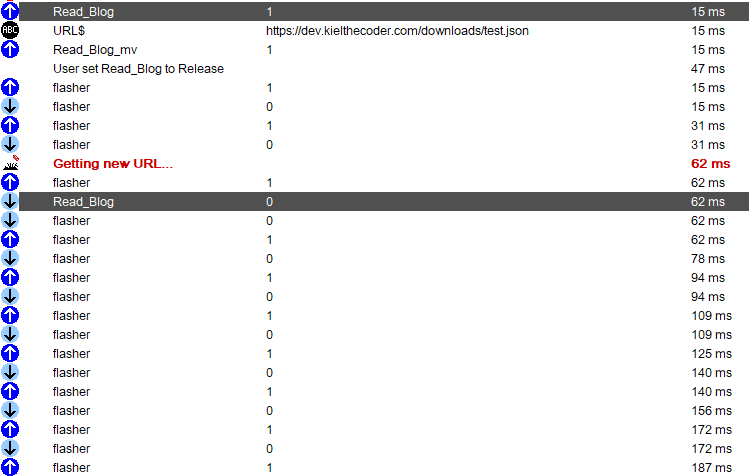
Our Trace message prints out while flasher is busy oscillating. Inside SIMPL+, we’re probably blocked on the GetContent method, but that’s OK because our SIMPL program is happily firing away.
Further down, you can see things complete. For some reason, this request took a long time (6 seconds after the request was sent):

I ran another test and things completed much faster:
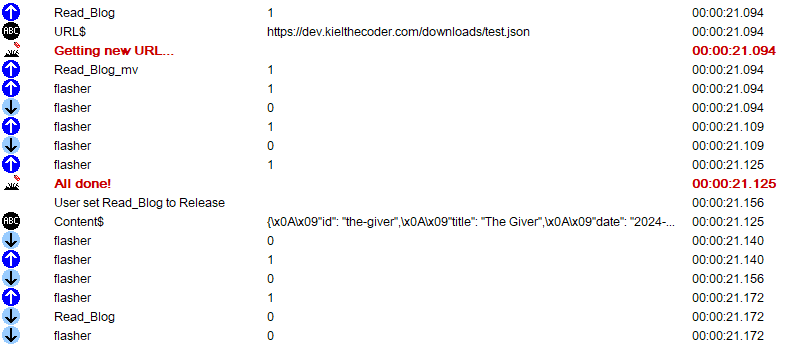
I know this is a bit of a contrived example, but I wanted to show that powerful language features like async/await are still available in the C# level, as long as you hide what you’re doing from SIMPL+.
I hope I can post my code for NewTek/Vizrt Spark IO control soon, once I’ve had a chance to clean up my code. Thanks for reading!
 Kiel the Coder