I started to write a series of posts about programming on Crestron’s VC-4 platform, but realized I should probably back up and document how I got my VC-4 instance running.
Continue reading “VC-4: Part 0”Author: Kiel
Crestron MC3 Tear-down
Saw another wave of failed MC3 processors while browsing the Crestron forums so I decided I’d better make a backup of my SD card while I still could.
To get the cover off, I had to remove all visible screws from the outside (including the grounding screw). There’s also a lock nut on the RF antenna that had to be removed. The whole board slides out from the rear of the unit.
Once out of the chassis, there are two plastic screws holding a daughter board down. I removed those, then pulled the daughter board out. This exposes the SD card below. I had to slide the SD card to the right to unlock the socket, then I could remove it.
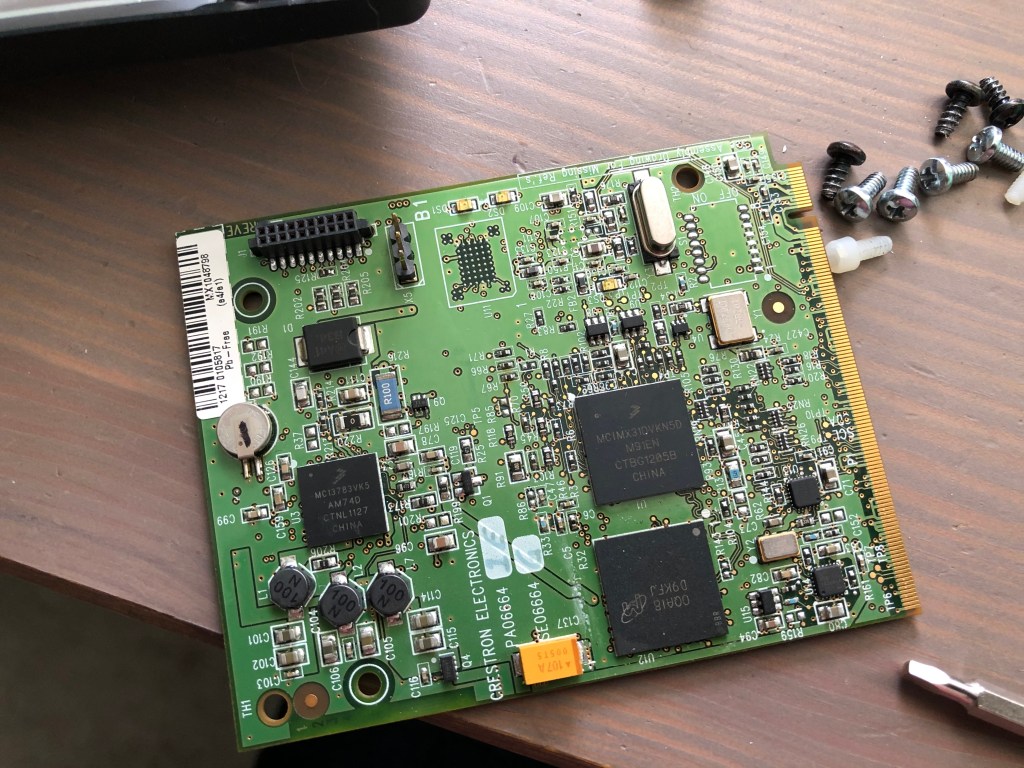
Using Ubuntu, I made a copy of the SD card and compressed it for storage in my Dropbox:
$ dd if=/dev/sde of=mc3-sd-card.img
$ bzip2 -v9 mc3-sd-card.img
Now I have a copy of the SD card saved, I wondered what was actually on it. First I tried fdisk to see what it reported:
$ fdisk -l mc3-sd-card.img
Disk mc3-sd-card.img: 1.9 GiB, 2027945984 bytes, 3960832 sectors
Units: sectors of 1 * 512 = 512 bytes
Sector size (logical/physical): 512 bytes / 512 bytes
I/O size (minimum/optimal): 512 bytes / 512 bytes
So fdisk didn’t detect any partition scheme. Maybe it’s just a FAT file system?
$ sudo mount -t vfat -o loop,ro mc3-sd-card.img /mnt
mount: /mnt: wrong fs type, bad option, bad superblock on /dev/loop6, missing codepage or helper program, or other error
$ sudo mount -t auto -o loop,ro mc3-sd-card.img /mnt
mount: /mnt: wrong fs type, bad option, bad superblock on /dev/loop6, missing codepage or helper program, or other error
What’s in this file? Using hexdump, I can page down and find messages about the Windows CE Ethernet Boot loader…
000219a0  31 39 3a 34 31 3a 33 33  00 00 00 00 4f 63 74 20  |19:41:33....Oct |
000219b0  20 37 20 32 30 31 35 00  57 69 6e 64 6f 77 73 20  | 7 2015.Windows |
000219c0  43 45 20 45 74 68 65 72  6e 65 74 20 42 6f 6f 74  |CE Ethernet Boot|
000219d0  6c 6f 61 64 65 72 20 25  64 2e 25 64 20 28 25 73  |loader %d.%d (%s|
000219e0  20 25 73 29 20 66 6f 72  20 43 72 65 73 74 72 6f  | %s) for Crestro|
000219f0  6e 0d 0a 00 50 52 4f 47  52 41 4d 20 52 45 51 20  |n...PROGRAM REQ |
I’m sure there is some information to be found reading Microsoft’s documentation. Maybe I’ll come back to this again someday?
Upgrading Ubuntu 18.04.4 to 20.04
My home NAS / Plex server is currently running Ubuntu Server 18.04.4. I have no plans to upgrade until Canonical releases 20.04.1, but in the meantime I wondered if I could run through the procedure in a VM to see if there are any gotchas going from 18.04.4 to 20.04.
Continue reading “Upgrading Ubuntu 18.04.4 to 20.04”FreeBSD Cheat Sheet
To update the system, type:
# freebsd-update fetch
# freebsd-update install
To search for new software and install it, type:
# pkg search vim
# pkg install emacs
To search the ports collection, type:
# cd /usr/ports
# make search name=lsof
Using the portupgrade utility:
# cd /usr/ports/ports-mgmt/portupgrade
# make install clean
# portupgrade -a
# portsclean -C
Running as a guest in VirtualBox: https://www.freebsd.org/doc/en_US.ISO8859-1/books/handbook/virtualization-guest-virtualbox.html
# cd /usr/ports/emulators/virtualbox-ose-additions && make install clean
/etc/rc.conf:
vboxguest_enable="YES"
vboxservice_enable="YES"
vboxservice_flags="--disable-timesync"
To scroll the console up or down, press Scroll Lock. Then you can use the arrow keys, page up/down to scroll around in the console window. When you’re done, press Scroll Lock again.
The Future of AV Programming: Part 4
This is the final entry in my series on the future of AV programming. I started writing it over a year ago, but kept putting it down. It’s probably time to just get something out there and move onto the next idea. Getting my thoughts organized on this topic has been difficult because they keep changing. It’s an underwhelming finish, but the road ahead is widening, making it hard to pin down what’s good or bad about where we’re currently at.
Continue reading “The Future of AV Programming: Part 4”SIMPL# Pro Primer: Part 5
Our goal in this project is to program a simple huddle room system. We’re going to design something that looks like this:

Over time, we’ll flesh this program out into something with more features, but for this part, it’s going to remain pretty bare-bones.
Continue reading “SIMPL# Pro Primer: Part 5”SIMPL# Pro Primer: Part 4
Originally, I wanted to make Part 4 similar to the program in Part 3, just showing how to do it with a DMPS instead. But testing it means I have to get a DMPS setup in my lab and I don’t feel like doing that just yet. So instead, we’ll take a step back and look at how to gather information about the processor we’re running on.
Continue reading “SIMPL# Pro Primer: Part 4”SIMPL# Pro Primer: Part 3 (continued)
We didn’t get very far in the last tutorial, but we did get all of our devices added successfully to the program. We’re going to continue using the same project and finish it by creating a user interface and adding some program logic.
Continue reading “SIMPL# Pro Primer: Part 3 (continued)”SIMPL# Pro Primer: Part 3
By now you should be a pro at creating new SIMPL# Pro projects. Let’s create another one, but we’re going to set this one up slightly different this time. We’ll still call it Part3, but change the solution name to Primer:

SIMPL# Pro Primer: Part 2
In Part 2 of this primer, we’re going to keep things simple… another Hello World program. Sorry, maybe Part 3 will cover something more exciting?
Continue reading “SIMPL# Pro Primer: Part 2”
