Today I was asked if it is possible to recover a VTZ (compiled touchpanel layout) from a physical panel and use it on a replacement panel. In this particular case, they want to take the layout off a TST-902 panel and use it on a new TSW-760 that is being installed. The client doesn’t have the existing uncompiled project (and possibly can’t get it). I said it might be possible as a last resort, but for the sake of maintenance and service, lets try to get the uncompiled project first.
This is one of those areas where I feel AMX and Extron are superior: taking over an existing project. You can generally connect to their equipment and pull down uncompiled versions of the program and touchpanel. At least with Crestron there’s now the option to embed an uncompiled version of the code into the program, but touchpanel layouts are still a one-way operation. Once it’s compiled and loaded to the touchpanel, that’s it.
I will confess a secret: at some point I gave up having separate SmartGraphics layouts for each panel type. I settled on the TSW-750 as the middle ground, and would let other panels scale the project to their native sizes. The only exceptions were the extreme ends like the TSW-550, TS-1542, and DGE. Those would get a unique layout due to their different sizes. This approach generally works pretty well, and when clients ask for changes, it’s much easier to make sure all panels get updated with the same layout.
I’ve never tried to recover the layout from a TST-902, and I’ve definitely never tried to apply that to a different panel type. So lets give it a shot!
What’s Inside a VTP?
The uncompiled touchpanel layout has a VTP extension. It contains all the pages, subpages, graphics, sounds, and text that make up the touchpanel layout. It’s not a common file format, and if you poke around using a hex editor, most of the file is bits of property descriptions interspersed with binary data. It’s not easy to follow.
When you compile it inside VT Pro-e, it produces a VTZ file that actually gets loaded to the touchpanel.
What’s Inside a VTZ?
A VTZ is actually just a zipped archive. It has a common structure:
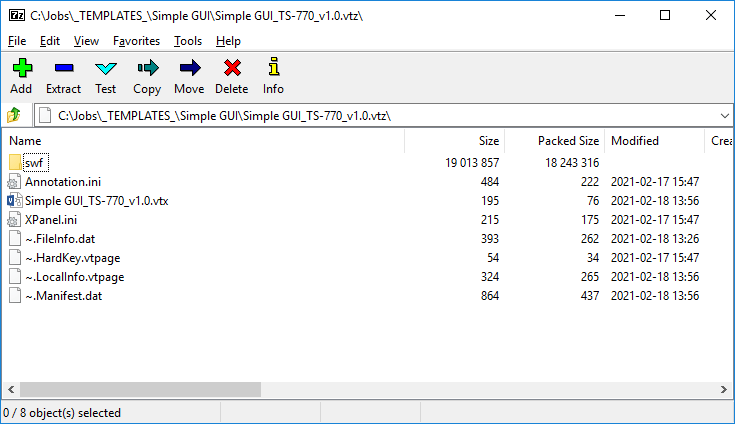
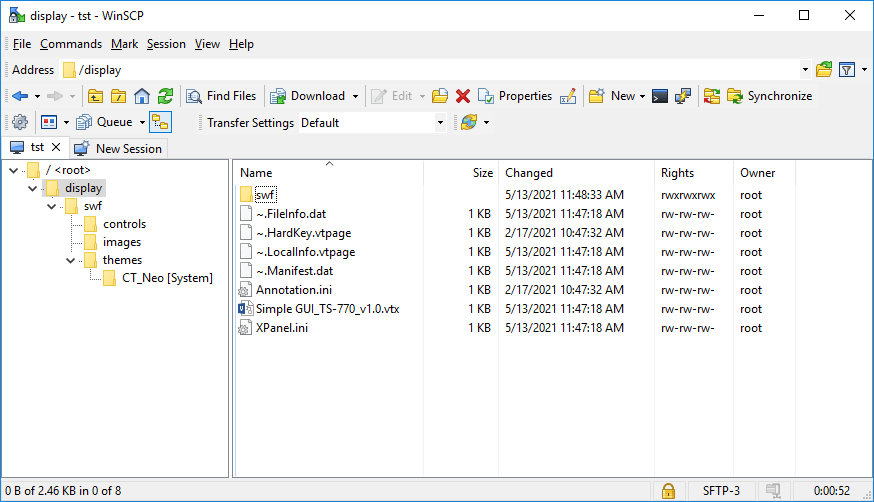
If I load this project to a TST-902 panel, I can use WinSCP to see the same file structure in the /display folder:
Recovery
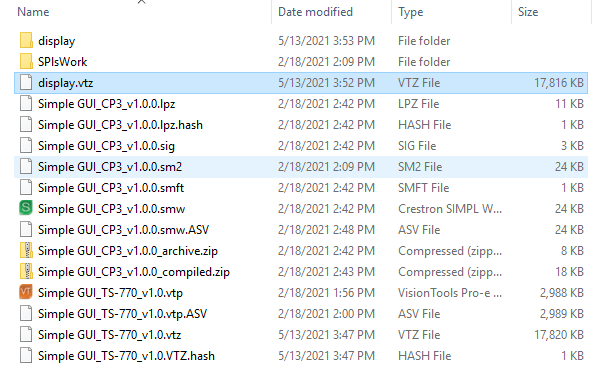
If I download the /display folder and zip it up with 7-zip, I can create a display.zip file that I’ll rename to display.vtz, the file size is a little smaller than the original VTZ:
Now I’ll try loading the recovered display.vtz to a different panel (TSW-1050 in this case):

And there you go! If you absolutely had to recover the project from a panel to use on a replacement, it can be done, but you’ll have no way to modify it in VT Pro-e.
 Kiel the Coder
Hello,
I tried this and i am having trouble loading the vtz after following your steps and converting. I get an error in toolbox of, Error extracting the file from the archive C:Users and then the file path to the project folder after Users of course.
I used the default settings in 7Zip but am wondering if there are modifications that I need to make it work. Any help would be appreciated!
LikeLike
I would make sure that you used the ZIP format and not 7ZIP format when compressing the downloaded “display” folder. 7ZIP offers better compression but Toolbox won’t be able to work with it.
LikeLike
Oh, of course! Thank you so much for the reply, I’ll give that a try.
Cheers!
LikeLike
I am unable to get a working vtz file from this uncompress/recompress method. Tried using both the windows built in compression, and 7Zip default settings. Using a vtz file that loads in xpanel before uncompressing, but even without any changes it does not load after compression.
Merely trying to put in host settings to make things easier on a client. I know it’s best to do from the proper software but contracted programmers can drag their feet some times…
LikeLike