This series of posts is going to put together some of what we learned in the Simple Sharp Primer and VC-4 posts. For an idea, here is what we’re going to build in Part 1:
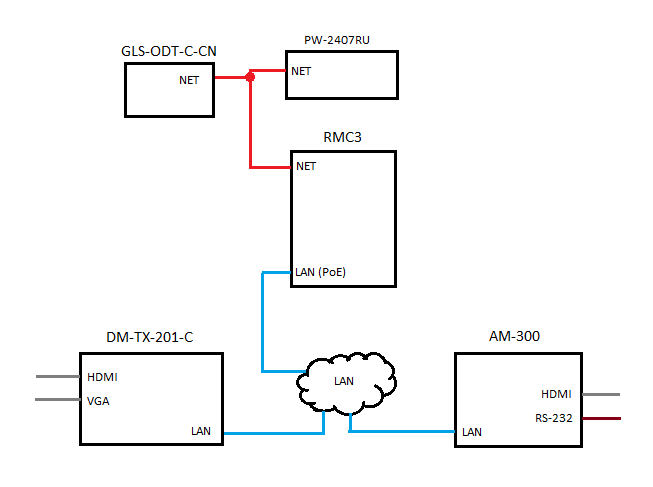
This series of posts is going to put together some of what we learned in the Simple Sharp Primer and VC-4 posts. For an idea, here is what we’re going to build in Part 1:
One of the coolest features of the new 4-series platform is Crestron has removed the sandbox environment. We’re now free to use modern tools and languages to develop for their devices! In this post, I’ll walk through how to create a new project in VS2019 for the VC-4.
Continue reading “VC-4: Breaking out of the Sandbox”In this part, we’ll work on adding the NVX devices into our program. Let’s review the overall design real quick to see what we have left:

In the last part, we got an XPanel connected to our VC-4 room and made it change state a little. We aren’t going to add much in this part, just a few changes to make things a little nicer for us.
Continue reading “VC-4: Part 3”In the last part, we got a program loaded to our VC-4 server, started it, and that’s all it did. This time, we’re going to add an XPanel so we can interact with the system.
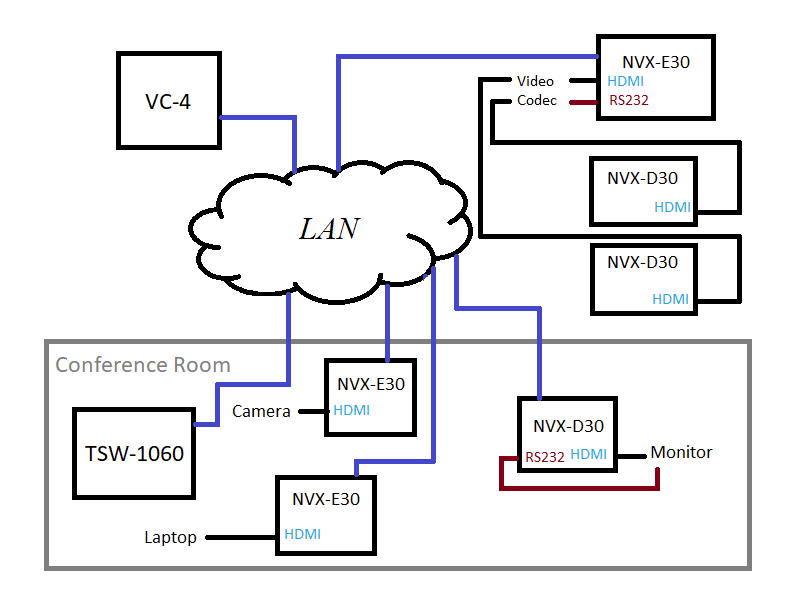
Continue reading “VC-4: Part 2”I’d like to write a program that explores VC-4 since it’s the only 4-series platform I’ll have access to for a while. And since VC-4 doesn’t run the logic engine, we get to program the whole thing in SIMPL#! Here’s a rough drawing of how this system will function:
I started to write a series of posts about programming on Crestron’s VC-4 platform, but realized I should probably back up and document how I got my VC-4 instance running.
Continue reading “VC-4: Part 0”This is the final entry in my series on the future of AV programming. I started writing it over a year ago, but kept putting it down. It’s probably time to just get something out there and move onto the next idea. Getting my thoughts organized on this topic has been difficult because they keep changing. It’s an underwhelming finish, but the road ahead is widening, making it hard to pin down what’s good or bad about where we’re currently at.
Continue reading “The Future of AV Programming: Part 4”Our goal in this project is to program a simple huddle room system. We’re going to design something that looks like this:

Over time, we’ll flesh this program out into something with more features, but for this part, it’s going to remain pretty bare-bones.
Continue reading “SIMPL# Pro Primer: Part 5”Originally, I wanted to make Part 4 similar to the program in Part 3, just showing how to do it with a DMPS instead. But testing it means I have to get a DMPS setup in my lab and I don’t feel like doing that just yet. So instead, we’ll take a step back and look at how to gather information about the processor we’re running on.
Continue reading “SIMPL# Pro Primer: Part 4” Kiel the Coder