In this part, we’ll add support for pages to our phonebook. That may not sound like much, but it will set us up for the 4th (and final) part where we wrap everything into a SIMPL User Macro that we can easily drop into our programs.
Continue reading “Soup-to-Nuts: Phonebook Module (Part 3)”Tag: crestron
Soup-to-Nuts: Phonebook Module (Part 2)
In this part, we’ll continue to develop our Phonebook class to provide more functionality to our SIMPL Windows programs. We won’t quite finish in this part, but we’ll be very close.
Make sure you download the current source code from GitHub, too.
Continue reading “Soup-to-Nuts: Phonebook Module (Part 2)”Soup-to-Nuts: Phonebook Module (Part 1)
I thought it would be a good idea to document from start to finish (soup to nuts) the process of building modules in SIMPL#. I hope to do a few of these as I build out some helpful modules.
Code is available at https://github.com/kielthecoder/SoupToNutsModules.
Continue reading “Soup-to-Nuts: Phonebook Module (Part 1)”SIMPL Tips and Tricks: Logic Wave Delay
SIMPL is an amazing tool to build control system logic with, but it can bite you sometimes in the way it evaluates a solution. Let me be clear: SIMPL is doing the right thing, but we have to train our brain to think around it to get the result we want. Here’s a simple example using the Logic Wave Delay symbol.
Continue reading “SIMPL Tips and Tricks: Logic Wave Delay”Huddle Room: Part 2
In the previous post, we created a simple Huddle Room system… but the logic is tightly-coupled, it’s rigid, and I wouldn’t call it a framework. Let’s refactor it!
Continue reading “Huddle Room: Part 2”Huddle Room: Part 1
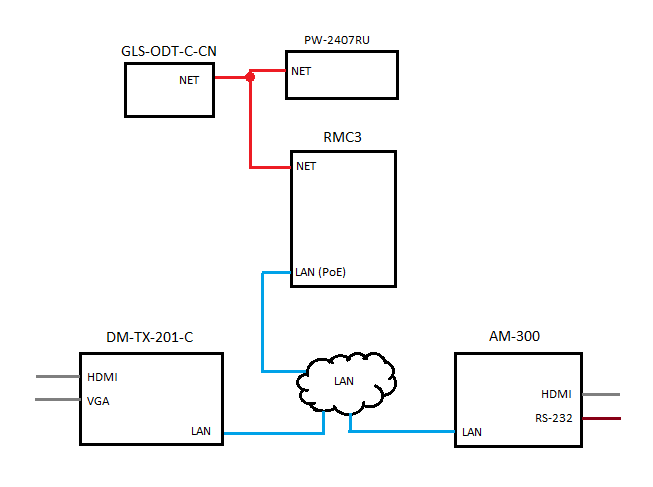
This series of posts is going to put together some of what we learned in the Simple Sharp Primer and VC-4 posts. For an idea, here is what we’re going to build in Part 1:
VC-4: Breaking out of the Sandbox
One of the coolest features of the new 4-series platform is Crestron has removed the sandbox environment. We’re now free to use modern tools and languages to develop for their devices! In this post, I’ll walk through how to create a new project in VS2019 for the VC-4.
Continue reading “VC-4: Breaking out of the Sandbox”VC-4: Part 4
In this part, we’ll work on adding the NVX devices into our program. Let’s review the overall design real quick to see what we have left:

VC-4: Part 3
In the last part, we got an XPanel connected to our VC-4 room and made it change state a little. We aren’t going to add much in this part, just a few changes to make things a little nicer for us.
Continue reading “VC-4: Part 3”VC-4: Part 2
In the last part, we got a program loaded to our VC-4 server, started it, and that’s all it did. This time, we’re going to add an XPanel so we can interact with the system.
Continue reading “VC-4: Part 2”
